
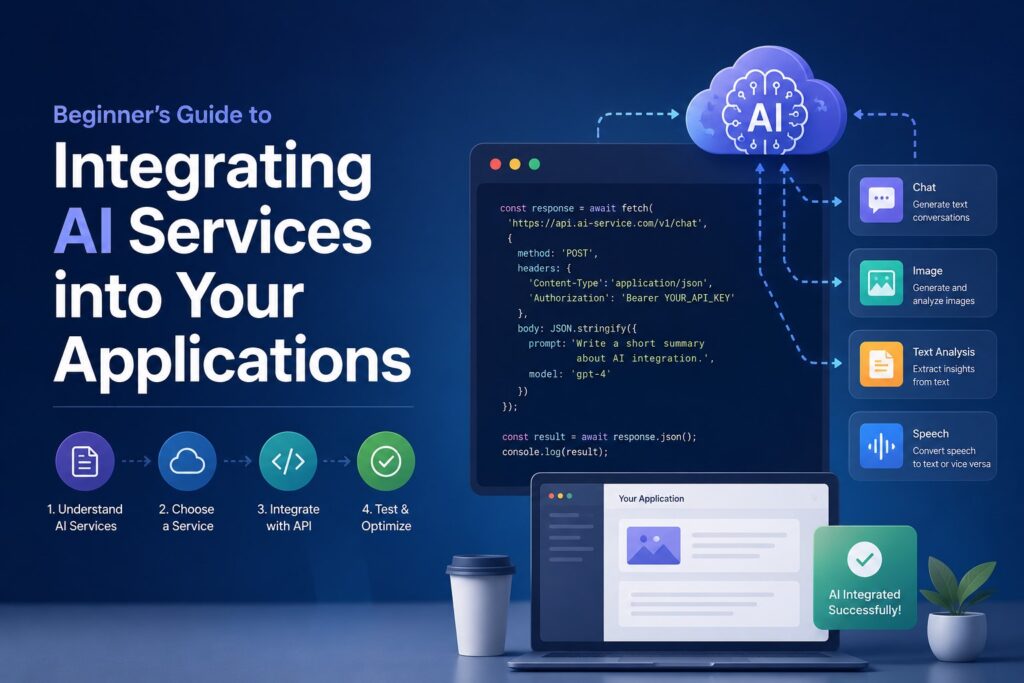
What is AI Integration?
AI integration is the process of embedding artificial intelligence capabilities—such as machine learning (ML), natural language processing (NLP), computer vision, and generative AI—into existing software applications, websites, or internal workflows.
Instead of building AI models from scratch, which requires massive data and specialized data science teams, modern software developers typically connect to pre-trained AI models via APIs (Application Programming Interfaces). This allows applications to reason, learn, and adapt to user behavior in real-time.
Benefits of AI Integration (with Real-World Examples)
- Enhanced User Experience (UX): AI personalizes interactions based on real-time user behavior, making apps feel intuitive.
Real-World Example: Netflix uses machine learning algorithms to analyze your viewing history, search queries, and even the time of day you watch to recommend custom thumbnails and shows tailored specifically to your taste.
- Increased Operational Efficiency: Automating repetitive, data-heavy tasks reduces manual labor and human error.
Real-World Example: Klarna integrated an AI assistant into their customer service app. In its first month, the AI handled 2.3 million conversations—doing the work of 700 full-time agents—while maintaining high customer satisfaction and resolving issues in under 2 minutes compared to 11 minutes previously.
- Data-Driven Insights and Forecasting: AI can spot trends and anomalies within massive datasets that human analysts might miss.
Real-World Example: Uber uses predictive AI models to analyze historical traffic patterns, weather, and current rider demand to calculate dynamic “surge pricing” and predict exact driver arrival times (ETAs).
- Seamless Scalability: Cloud-based AI APIs allow your app to process thousands of complex requests simultaneously without crashing your core infrastructure.
Step-by-Step Guide to Integrating AI Services
Successfully adding AI to your product requires a strategic approach. Here is how to execute it from concept to launch:
1. Identify Your Needs and Scope
Don’t add AI just because it’s a trend. Pinpoint a specific pain point in your user journey. Are users dropping off during onboarding? Are customer support response times too slow? Is data entry taking your team too long?
2. Choose the Right Approach: API vs. Custom Model
Decide whether you need a pre-built API or a custom solution. For 90% of businesses, utilizing existing cloud APIs is faster and more cost-effective than training a model from scratch.
| Factor | Pre-built AI APIs (e.g., OpenRouter, OpenAI) | Custom ML Models (e.g., TensorFlow) |
|---|---|---|
| Time to Market | Hours to Days | Months to Years |
| Cost | Low (Pay-per-use) | High (Infrastructure + Data Scientists) |
| Flexibility | Standardized capabilities | 100% customized to proprietary data |
3. Develop a Minimal Viable Product (MVP) / Prototype
Before changing your production codebase, build a small prototype using tools like Postman or Python scripts to test the AI’s responses. Ensure the AI handles edge cases gracefully (e.g., how the AI responds when a user inputs gibberish).
4. Implement, Monitor, and Secure
Connect the AI to your application backend. Ensure you treat data privacy seriously: never send sensitive user information (like passwords or medical records) to public AI APIs without proper encryption and compliance checks.
5. Gather Feedback and Iterate
Set up analytics to track how users interact with the AI features. Use thumbs up/down buttons or analyze conversion rates to continuously refine the prompts or models you are using.
Best AI Tools for Integration
Depending on your technical stack and project goals, here are the top industry tools for integration:
- OpenRouter: A powerful aggregator API that allows developers to access dozens of leading Large Language Models (LLMs) through a single, unified interface. It simplifies switching between models to optimize for cost or speed.
- ChatGPT / OpenAI API: The gold standard for text generation, code assistance, and complex reasoning. Perfect for building advanced chatbots, translation tools, or content summarizers.
- TensorFlow: An open-source, flexible library by Google designed for developers who want to build, train, and deploy custom machine learning models locally or in the cloud.
- Dialogflow: A Google Cloud tool specifically optimized for building natural, conversational user interfaces (voice and text) for customer support channels and smart devices.
Discover AI Tools on DaleelAI
Finding the right software stack is critical to a successful launch. Explore a curated, wide-ranging directory of cutting-edge AI tools on DaleelAI to find solutions perfectly tailored to your application’s architecture:
- OpenRouter: Compare prices and latency across multiple LLMs instantly.
- ChatGPT API: Leverage state-of-the-art conversational intelligence.
- TensorFlow: Build highly specialized deep learning structures.
- Dialogflow: Create automated, multi-lingual customer service flows.
Conclusion
- AI integration drives measurable business value: From personalization like Netflix to automation like Klarna, AI directly impacts retention and margins.
- Start lean: Utilize unified APIs like OpenRouter to prototype your ideas rapidly before investing heavily in custom infrastructure.
- Focus on security and UX: Ensure your integration remains secure, private, and continuously optimized based on real user feedback.
Ready to supercharge your software? Visit DaleelAI today—your ultimate digital directory for discovering, comparing, and implementing the world’s best AI solutions.

Comments
0No comments yet.
Please log in to comment.
Comments are available for members only. Sign in to participate in the discussion, or create a new account for free.