

Open this AI tool now
https://next3d.ai/When creating 3D models becomes a matter of seconds, not days
Imagine writing a simple descriptive sentence or uploading an ordinary image, and within moments it turns into a complete 3D model that you can rotate, export, and embed in your projects. This is exactly what the Next3D platform offers: an AI tool specialized in generating and editing 3D content, embodying a real shift in how designers, developers, and marketers engage with the 3D world—without the need to master massive programs like Blender or Maya.
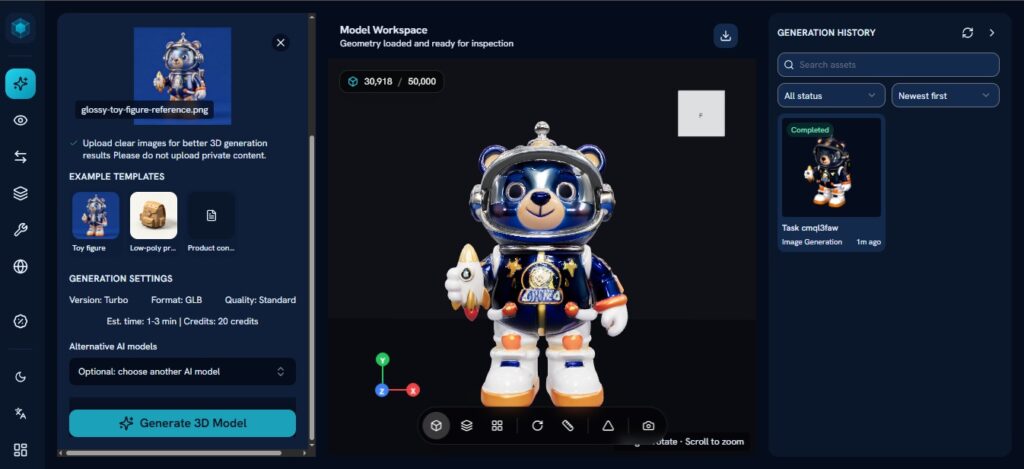
What is the Next3D tool?
Next3D is an AI-based platform that enables users to generate 3D models from multiple inputs, most notably: descriptive text (Text-to-3D) and 2D images (Image-to-3D). The platform is based on deep generative models trained on millions of shapes and spatial structures, which enables it to build a polygon mesh (Polygon Mesh) or a volumetric representation (Volumetric Representation) of the desired object.
Tired of juggling ten tabs? ToolSuite bundles the AI workflow tools power users rely on — in one place.
Try ToolSuite NowThe core idea is to remove the technical barrier that non-specialists face when dealing with 3D environments. Instead of learning concepts like Rigging, UV Mapping, or Subdivision Modeling, the user simply describes what they want or imports an image of the object, and the algorithms take care of the rest. The output is not just a flat preview, but a model that can be exported in common formats such as OBJ, GLB/GLTF, and FBX, which are formats supported in game engines and interactive platforms alike.
Key Features of Next3D
1. Text-to-3D Generation (Text-to-3D)
You enter an English text description such as: “a wooden medieval chair with carved armrests”, and the system generates a 3D model that reflects the mentioned details. This is the fastest route to obtaining an editable prototype, and it is ideal in the early stages of design exploration.
2. Image-to-3D Generation (Image-to-3D)
You can upload an image of a product, character, furniture, or any physical object, and the platform converts it into a 3D model using AI-based 3D reconstruction techniques (3D Reconstruction). Results vary depending on the quality of the input image and the shooting angle, as images with a clean white background provide the best outputs.
3. Interactive 3D Editor
After generation, the built-in editor allows basic edits such as changing colors and materials (Materials), adjusting the model’s size, and previewing it from multiple angles before export. It’s not an editor at the level of Blender, but it’s sufficient for quick edits without leaving the browser.
4. Multiple Export Options
Export is supported to OBJ, GLB, FBX, and STL formats (for 3D printing). Direct support for GLB makes the models ready for immediate use in engines like Unity, Three.js, and Babylon.js, and even in e-commerce platforms that support 3D product viewing.
5. Ready-Made Model Library
The platform includes a library of pre-generated, editable models, covering categories such as furniture, cars, characters, and architecture. You can start from them to speed up work instead of starting from scratch every time.
6. API Interface for Developers
Next3D provides programmatic access via an API that enables developers to integrate 3D model generation directly into their own applications or commercial platforms, expanding the tool’s use beyond the visual interface.
How to Use Next3D: A Step-by-Step Guide
- Sign up: Go to next3d.ai and create a free account using your email or a Google account. Registration takes no more than two minutes.
- Choose a creation mode: After entering the dashboard, choose between the “Text to 3D” or “Image to 3D” modes depending on your input source.
- Enter the description or image: In text mode, write a detailed description in English (the more precise the description, the better the results). In image mode, upload a PNG or JPG file with a resolution of at least 512×512 pixels to get acceptable results.
- Adjust generation settings: You can set the detail level (Detail Level) and texture style (Texture Style) from the available options menu, which affects the model quality and generation time.
- Wait and preview: The generation process usually takes between 30 seconds and two minutes. Once complete, an interactive 3D preview appears that you can rotate with the mouse.
- Edit and export: Use the color and materials editor for any simple adjustments, then choose the appropriate export format and download the file.
- Import into your workflow: Open the file in your preferred software (Blender, Unity, or Unreal Engine) to make advanced improvements when needed.
Practical Advantages and Benefits
For Designers and Creatives
A graphic designer who needs a 3D model for an advertising shoot can obtain an initial draft in less than two minutes instead of spending hours in traditional modeling software. For example: designing a product package in a 3D style to display within a marketing material without needing a specialized 3D designer.
For Developers and Game Makers
A developer building a game prototype (Prototype) can obtain quick 3D assets to test game mechanics without waiting for the art team. Exported files in GLB format are imported directly into Three.js to build interactive 3D web experiences.
For E-commerce Platforms
Displaying products in 3D increases conversion rates in a documented way in studies. An online furniture seller can upload photos of their products and convert them into 3D models that allow the buyer to rotate them and see them from all angles before purchasing.
For Marketers and Visual Content
Creating engaging visual content with 3D elements for platforms like Instagram and TikTok has become possible without a specialized production team. A 3D model of a new product can be exported as a rotating clip or integrated into an advertising template.
Drawbacks and Challenges
Accuracy of Generated Models
The resulting models do not always match the accuracy of what a 3D professional produces manually. Human faces and fine details such as text or complex ornaments remain problematic for most generation systems, including Next3D, and may require manual mesh cleanup (Mesh Cleanup) before being used in professional projects.
Limitations of the Built-in Editing Mode
The platform’s internal editor is limited compared to specialized editing tools. If you need to add control points (Control Points), perform retopology (Retopology), or precisely adjust UV maps, you will need to export the model and continue working in an external program.
Arabic Is Absent from the Input Interface
All text prompts require English, which poses an obstacle for Arab users who are not proficient at formulating technical descriptions in English.
Performance Varies Depending on the Input
Models created from images with cluttered backgrounds or poor lighting yield low-quality results. Responsibility for improving the input image falls on the user.
Limitations in the Free Plan
The number of daily generation operations is limited in the free plan, which means users with high needs will find themselves facing the necessity to upgrade early.
Comparison of Next3D with Competing Tools
Next3D vs Meshy AI
Meshy AI is among the closest competitors in terms of direction and features. Meshy stands out with a sleek interface and broader control options over texture style and mesh quality, while Next3D offers a faster and simpler experience for beginner users. In furniture model generation tests, Meshy showed cleaner geometry, but Next3D was faster at generation.
Next3D vs Luma AI (Genie)
Luma AI became known for its NeRF (Neural Radiance Fields) technology for reconstructing scenes from video or a set of images, which makes it more accurate when dealing with real-world objects. As for Next3D, it is easier for text input and more suitable for users who don’t have video clips of their objects.
Next3D vs Shap-E (OpenAI)
Shap-E is an open-source tool from OpenAI that enables text-based generation of 3D models, but it requires a technical environment (Python) to run, which makes it less accessible to non-technical users. Next3D wins here with ease of use directly through the browser.
Next3D vs Spline AI
Spline provides an integrated 3D design environment with AI features, but it is designed more for interactive design and building web experiences. Next3D is more suitable for someone who wants to generate a quick model and export it, not for someone building a fully integrated interactive scene.
Practical examples of using Next3D
Scenario 1: A restaurant design that wants to display a menu with 3D components
The restaurant owner uploads photos of the dishes; Next3D turns them into 3D models that can be embedded in an interactive digital menu on the web. The customer rotates the model and sees the dish from every angle before ordering.
Scenario 2: A fashion designer who wants to showcase a 3D model of a new shoe
He writes the description: “a modern white leather sneaker with minimalist design”, generates the model, adjusts its color to match his design, exports it as GLB, and embeds it in his online store website to display the shoe in a 360-degree view.
Scenario 3: An independent web game developer
He needs five models for environmental elements (trees, rocks, wood) for a Three.js project. He generates all the models within 15 minutes, exports them as GLTF, and imports them into his project to run a playtest (Playtest) without waiting for a 3D artist.
Scenario 4: A technology teacher at a school
He wants to create 3D models of parts of the human body to display to students. He generates models for the heart, lungs, and skull with simple text prompts, embeds them in an interactive presentation, and allows students to interact with them on the screen.
Pricing
Next3D follows a tiered pricing model that starts with a free plan and extends to paid plans:
- Free Plan: Allows a limited number of generations per day (usually 3–5), with support for exporting in basic formats and no watermark in some cases.
- Basic Plan: Ranges between $10 and $20 per month, and provides a larger number of monthly generations (50–100) and higher model quality.
- Pro Plan: Starts at $40 per month, and includes unlimited or very high generation limits, API access, and processing priority.
- Enterprise Plan: Custom pricing that includes full API support, service level agreements (SLA), and dedicated technical support.
It is worth noting that the platform’s prices are subject to change, so it is recommended to review the official pricing page on next3d.ai to see the current offers.
Evaluation and Tips
Who benefits most from Next3D?
- Product and marketing designers: those who need 3D models for showcasing and advertising without diving into the complexities of modeling software.
- Developers in the prototyping phase: who want quick 3D assets to test their ideas.
- E-commerce store owners: to display their products in a 3D style without a huge budget.
- Digital content creators: to enrich their visual content with 3D elements.
Who is Next3D not suitable for?
- Seasoned 3D professionals: who need full control over topology, rigging, and advanced shading.
- Film production studios: where Next3D’s quality is not sufficient for direct use without substantial modifications.
- Arabic-only users: as the tool requires proficiency in English to describe text inputs.
Tips to get started
- Start with text-to-generation using detailed descriptions that include material, color, shape, and purpose.
- For images, prepare images with a white background or use background-removal tools first to get better results.
- Don’t expect a final model on the first try; generation is an iterative process—try different descriptive phrasings.
- Check mesh density (polygon count) before importing into game engines to avoid performance issues.
Conclusion
Next3D offers real, tangible value for a wide range of users who need 3D models without wanting to make the significant time and financial investment that traditional modeling tools require. Ease of use, fast generation, and a variety of export formats are its true strengths, while limited model accuracy and the absence of advanced editing tools remain obstacles to using it in high-quality professional projects without an additional refinement stage.
If you are a designer, developer, or product owner looking for a quick way to enter the 3D world without embarking on a long learning journey, then Next3D is worth a serious try, especially with its free plan available. But if your projects require high geometric precision and production-ready final assets, you will find that Next3D is an excellent starting point—not an end point.
Do you make Next3D? Add the DaleelAI badge to your site
Copy the code and paste it into your site’s footer or press page. It links to this page, so visitors can read about your tool in Arabic and English.





Comments
0No comments yet.
Please log in to comment.
Comments are available for members only. Sign in to participate in the discussion, or create a new account for free.